

How to Hire a Virtual Assistant for Your Business


Hiring a virtual assistant is the process of delegating administrative, customer management, and operational tasks to a remote professional so you can focus on growing your business. A virtual assistant, or VA, is the industry-standard term for this role. Small business owners across the United States use platforms like Upwork, Fiverr, OnlineJobs.ph, and R3source to find remote professionals who handle everything from inbox management to CRM updates. The key to making it work is not just finding the right person. It is building the right process before they ever start.
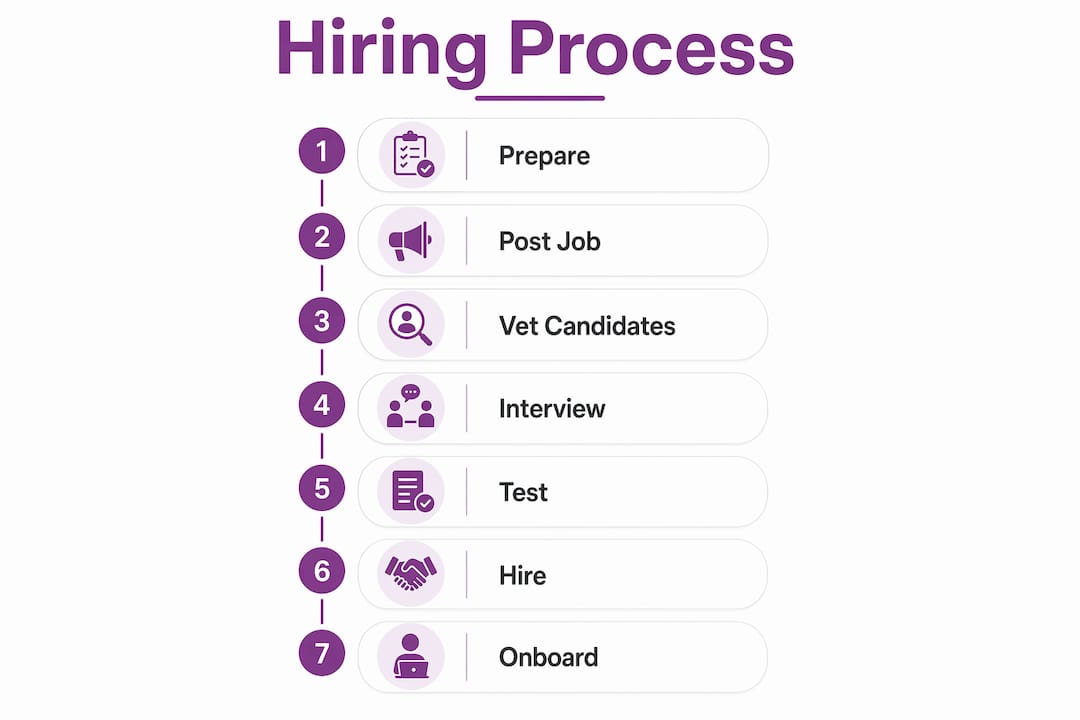
What to prepare before you hire a virtual assistant
Most hiring mistakes happen before the search even begins. Business owners post a job without knowing exactly what they need, and the result is a vague role that attracts the wrong candidates. The fix is simple: write down every task you do in a week, then sort them by how often they repeat, how much time they consume, and how much risk they carry.
Your list will likely fall into four categories:
Administrative support: Email triage, calendar management, travel booking, data entry
Customer management: Responding to inquiries, following up on leads, updating CRM records
Operational tasks: Research, report formatting, social media scheduling, invoice tracking
Executive support: Meeting prep, project coordination, vendor communication
Once you have that list, document 5 to 10 recurring tasks as standard operating procedures (SOPs) before you hire anyone. SOPs turn your personal knowledge into repeatable business assets. They also give you a clear benchmark for measuring performance from day one.
Security is the other preparation step most owners skip. Decide in advance which systems your VA will access, and set up role-based accounts with limited permissions. Password managers like 1Password or LastPass let you share credentials without exposing the actual passwords. This matters more than most people realize, especially in the early weeks of a new working relationship.
Pro Tip: If writing SOPs feels time-consuming, record a Loom video of yourself doing the task first. Transcribe it later. A rough SOP is always better than no SOP.
Which platforms are best for finding a reliable VA?
The platform you choose shapes your cost, your risk, and the quality of candidates you see. Each option works differently, and the right choice depends on your budget and how much time you want to spend managing the process.
Platform | Pricing model | Best for | Key consideration |
Upwork | Hourly or fixed-price contracts | Experienced generalists and specialists | Requires active vetting; wide talent pool |
Fiverr | Per-project or monthly retainer | Quick, defined tasks | Rates range from $1 to $100+ per hour depending on skill |
Direct hire subscription | Filipino VAs at lower cost | You manage the relationship entirely | |
R3source | Dedicated remote staffing | Long-term, integrated team members | Managed accountability and onboarding support |
Freelance platforms give flexibility but require you to do your own vetting, testing, and management. Agencies and dedicated staffing partners like R3source provide professionals who are already screened and supported, which costs more upfront but saves significant time. Small businesses often find the sweet spot in the $7.50 to $31 per hour range, particularly when hiring from the Philippines, where English fluency and professional training are strong.
The decision also depends on task complexity. A one-time research project fits Fiverr well. A VA who will manage your customer inbox, update your CRM, and coordinate your calendar every week needs a more structured arrangement. For that kind of role, a dedicated remote staffing model produces better long-term results.
Pro Tip: Post a test job on Upwork or OnlineJobs.ph before committing to a platform. The quality of applicants you receive in the first 48 hours tells you a lot about whether that platform fits your niche.
How to vet, interview, and test VA candidates

Vetting is where most scams and bad hires are caught or missed. A polished profile and a confident message do not confirm competence. You need a structured process that tests actual ability before you commit.
Start with identity and profile consistency. Check that the candidate’s name, photo, work history, and portfolio match across LinkedIn, their platform profile, and any personal website. Inconsistencies are a red flag. Ask for a short video introduction early in the process. It confirms the person is real and communicates clearly.
During the interview, skip generic questions like “Tell me about yourself.” Ask scenario questions instead:
“Walk me through how you would organize an inbox with 400 unread emails.”
“A client emails with a complaint at 9 PM. What do you do?”
“You notice a recurring error in the CRM data. How do you handle it?”
These questions reveal process thinking, not just personality. The best candidates describe a clear sequence of steps. Weak candidates give vague answers about “doing their best.”
After the interview, assign a paid test task that mirrors actual job duties. Good examples include editing a draft SOP, building a research list from a brief, or completing a mock inbox triage. Pay fairly for the test. It filters out low-effort applicants and shows respect for the candidate’s time.
“The goal of a test task is not to get free work. It is to see how a candidate handles real conditions: ambiguity, instructions, and a deadline.”
Once you select a candidate, control access tightly from day one using role-based accounts, two-factor authentication, and shared password vaults. Review activity logs daily for the first 30 days. This limits the impact of any mistakes or misuse while trust is still being established. Banking, payroll, legal documents, and full inbox control should stay with you until the relationship is proven.
Pro Tip: Use a simple NDA template from DocuSign or PandaDoc before granting any system access. It sets a professional tone and protects your business from day one.
Best practices for onboarding your VA into your workflow
A smooth onboarding process is what separates a productive VA from a frustrated one. The first two weeks determine whether your new hire builds momentum or spins in confusion. Your job is to remove that confusion before it starts.
Share your SOPs on day one through a shared workspace like Notion, Google Drive, or ClickUp. Walk through each document on a video call. Confirm understanding before assigning the first real task. This single step prevents most early errors.
Key onboarding actions to take in the first 30 days:
Grant access to only the tools needed for the first assigned tasks
Schedule a 15-minute daily check-in for the first two weeks
Assign one primary task category before adding more responsibilities
Use a VA onboarding checklist to track progress and avoid gaps
Set clear performance benchmarks: response time, accuracy rate, task completion rate
Clear, detailed SOPs are the single biggest factor in onboarding success. They reduce back-and-forth questions, give your VA confidence, and make performance tracking objective rather than subjective. As trust builds, expand access gradually. A VA who handles inbox triage well for 30 days has earned access to draft responses. One who manages draft responses well for 60 days has earned more autonomy.
Integrate your VA with the communication and project tools your team already uses. Slack or Microsoft Teams for daily communication, Asana or Trello for task tracking, and your existing CRM for customer management. The goal is for your VA to feel like a real part of your operation, not a contractor waiting for instructions.
Key takeaways
Hiring a virtual assistant successfully requires clear task documentation, structured vetting, and a phased onboarding process built on SOPs before you ever post a job listing.
Point | Details |
Prepare before you post | Document 5 to 10 recurring tasks as SOPs before starting your search. |
Match platform to need | Use freelance platforms for defined tasks; use agencies or R3source for long-term integrated roles. |
Test before you trust | Assign a paid test task that mirrors real duties to confirm competence and filter scams. |
Control access from day one | Use role-based accounts, 2FA, and shared vaults during the first 30 days to limit risk. |
Onboard with structure | Share SOPs on day one, run daily check-ins for two weeks, and expand access as trust builds. |
What I’ve learned from watching business owners hire VAs
I have seen business owners hire a VA in a week and transform their operations. I have also seen them hire in a week and lose access to their email account. The difference was almost never the VA. It was the process the owner brought to the relationship.
The most common mistake is treating a VA hire like a personality decision. Owners pick the candidate they liked talking to, skip the test task, and hand over full inbox access on day one. When something goes wrong, they blame the VA. The real problem was the absence of structure.
What actually works is treating the first 30 days as a probationary system, not a trust exercise. You are not deciding whether to trust this person. You are building a system that does not require blind trust. SOPs, limited access, daily reviews, and clear benchmarks protect both of you. They also give a genuinely good VA the tools to succeed quickly.
The other thing I would tell any business owner: start smaller than you think you need to. Hire for one task category. Get that right. Then add more. Owners who try to hand off 15 tasks on day one create chaos for themselves and their VA. The ones who start with inbox management and CRM cleanup, get those running smoothly, and then expand, build something that actually lasts.
Patience and process beat personality every time.
— Ellis
Ready to build your remote support team?
R3source connects small and mid-sized businesses with dedicated remote professionals from the Philippines who are trained to integrate directly into your operations. Whether you need virtual assistant support for administrative tasks, customer management, or CRM work, R3source provides long-term staffing solutions built for accountability and growth.
R3source is not a freelance marketplace. Every professional is vetted, supported, and matched to your specific business needs. You get consistent performance without the overhead of a full-time employee. If you are ready to reclaim your time and build your capacity for growth, explore how R3source can support your team today.
FAQ
What tasks can a virtual assistant handle?
A virtual assistant handles administrative support, customer service, CRM management, appointment setting, inbox management, research, data entry, and social media scheduling. The specific tasks depend on the VA’s skills and the role you define before hiring.
How much does it cost to hire a virtual assistant?
VA hourly rates range from $1 to over $100 per hour depending on experience and location. Small businesses typically find cost-effective options in the $7.50 to $31 per hour range, especially when hiring remote professionals from the Philippines.
Where is the best place to hire a virtual assistant?
Popular options include Upwork, Fiverr, OnlineJobs.ph, and dedicated staffing agencies like R3source. The best platform depends on whether you need a short-term task completed or a long-term team member integrated into your workflow.
How do I avoid scams when hiring a VA?
Require a paid test task before hiring, verify profile consistency across platforms, and control system access tightly using role-based accounts and two-factor authentication from day one. Avoid granting access to banking, payroll, or legal systems until trust is established over at least 30 days.
Do I need SOPs before hiring a virtual assistant?
Yes. Documenting 5 to 10 recurring tasks as SOPs before you hire gives your VA clear instructions, reduces errors, and gives you an objective way to measure performance from the start.
Recommended
Comments