

How Virtual Staff Supports Digital Businesses in 2026


Virtual staff are defined as remote professionals who integrate directly into a business’s daily operations, handling tasks that would otherwise consume the owner’s most productive hours. Understanding how virtual staff supports digital businesses is the clearest path to scaling without the overhead of traditional hiring. Businesses combining virtual assistants with AI-driven workflows report productivity increases of 30–50% in administrative and operational tasks. That number reflects a structural shift, not a trend. The right virtual assistant, paired with the right tools, can replace the output of multiple full-time hires.
How virtual staff supports digital businesses: core functions
Virtual staff add the most value in the areas that consume your time without generating direct revenue. These are the tasks that keep your business running but pull you away from growth.
The functions where remote professionals deliver the clearest return include:
Email and inbox management. A virtual assistant using inbox triage protocols can cut email time by 60–70%. Add AI-assisted drafting tools, and that drops to roughly 20 minutes of email work per day.
CRM and pipeline management. Virtual assistants maintain CRM hygiene by updating records and setting follow-ups inside platforms like HubSpot or GoHighLevel. A neglected CRM costs deals. A well-managed one closes them.
Content and marketing support. One long-form piece of content can be repurposed into clips, captions, and social posts using tools like Descript, Canva, and Jasper. A virtual assistant handles this entire workflow while you focus on the original content.
Client onboarding. Remote professionals manage welcome sequences, collect intake documents, and schedule kickoff calls. This creates a consistent client experience without requiring your direct involvement every time.
Research and data summarization. Virtual staff compile competitive research, summarize reports, and prepare briefings. AI tools accelerate this work, but a skilled assistant applies judgment to what actually matters.
The benefits of virtual staff extend beyond task completion. They create space for you to work on your business rather than in it.
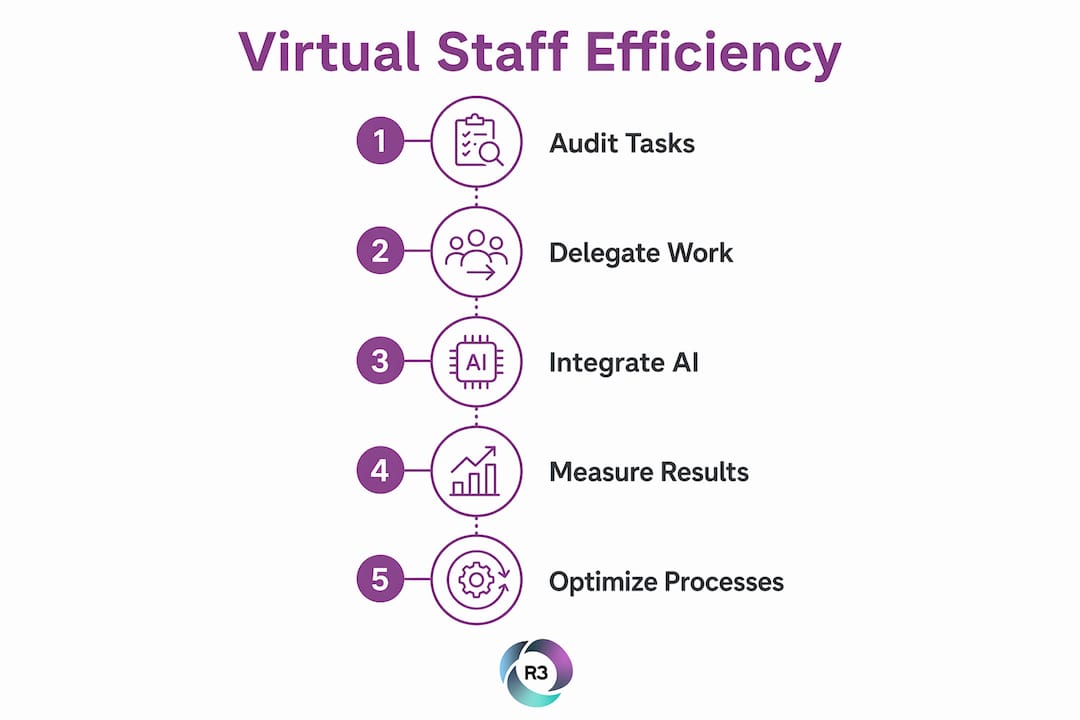
Pro Tip: Start by auditing one week of your calendar. Highlight every task that did not require your unique expertise. That list is your first delegation plan.

How do AI-integrated virtual assistants transform efficiency?
The real productivity gain comes from pairing a skilled virtual assistant with the right automation stack. Neither alone delivers the same result.
Here is how that combination works in practice across four key workflows:
Email and proposal generation. A virtual assistant uses AI drafting tools to prepare responses and proposals based on templates you approve once. You review and send. The assistant handles the rest.
Workflow automation. Tools like Zapier, Make, and GoHighLevel connect your apps and trigger actions automatically. A virtual assistant builds and maintains these automations, so your systems run without manual input.
Content repurposing. The assistant takes a recorded webinar or podcast episode and uses Descript to generate transcripts, Canva to create graphics, and Jasper to write captions. One piece of content becomes a week of marketing material.
CRM pipeline hygiene. The assistant audits your pipeline weekly, removes stale contacts, updates deal stages, and flags opportunities that need follow-up. This keeps your sales data accurate and your team focused on real prospects.
A single skilled virtual assistant combined with this kind of tool stack can replace the output of multiple hires. That is not an exaggeration. It is the practical result of removing manual steps from repeatable processes.
The impact on digital business support is measurable. Owners who delegate these workflows consistently report reclaiming 15 to 20 hours per week. Those hours go back into revenue-generating work.
What are best practices for hiring and integrating virtual staff?
Hiring the wrong virtual assistant costs more than not hiring at all. The screening process determines everything that follows.
The most effective approach to hiring remote professionals follows these principles:
Use paid test tasks. Testing candidates with real-world paid tasks that mirror actual job scenarios reveals skill and work style before you commit. A candidate who performs well on a test task will perform well on the job.
Assess async communication skills. Virtual staff working across time zones rely on asynchronous communication tools like Slack, recorded video updates, and written briefs. Ask candidates to submit a short video walkthrough of a task. How they communicate tells you as much as what they produce.
Build SOPs before day one. Standard operating procedures give your virtual assistant a clear reference point. Document your processes in writing, record screen walkthroughs, and store everything in a shared workspace like Notion or Google Drive.
Delegate in phases. Start with two or three defined tasks. Add responsibilities as the assistant demonstrates reliability. This phased approach prevents confusion and builds mutual trust.
Schedule weekly check-ins. A 30-minute weekly call covers blockers, priorities, and feedback. Keep it structured. Over time, these calls become shorter as the assistant builds autonomy.
Structured onboarding with SOPs and gradual task delegation within the first 30 days leads to higher output quality and a more confident remote team member. The investment in onboarding pays back quickly.
Pro Tip: Record a short Loom video for every new process you hand off. Written SOPs are useful, but video walkthroughs cut the learning curve in half.
For a deeper look at getting this right, the complete guide to virtual assistants for small businesses covers role design, task mapping, and common setup mistakes.
How to measure the impact of virtual staff on business performance
Measuring the return on your virtual staff investment requires clear metrics set before the work begins. Without a baseline, you cannot prove progress.
The most useful performance indicators for remote professionals fall into three categories: time saved, task completion rate, and revenue impact. Time saved is the easiest to track. Log how long you spent on a task before delegation, then compare it to your involvement after. Task completion rate measures whether work gets done on time and to standard. Revenue impact is harder to isolate but becomes visible when you track which activities you now have time to pursue.
Project management tools like Asana, ClickUp, or Trello give you a real-time view of task status without requiring constant check-ins. Pair these with tools for managing remote assistants to keep communication and accountability in one place.
Review delegated processes every 30 days. Ask whether the output meets your standard, whether the assistant has the resources needed, and whether the task still belongs with them or should be automated further. This review cycle prevents drift and keeps your remote team aligned with your current priorities.
The cost comparison between virtual staff and traditional hires is also worth tracking formally. A full-time in-office employee carries salary, benefits, equipment, and office costs. A skilled remote professional from R3source delivers comparable output at a fraction of that overhead. That gap widens as you add more tasks to the assistant’s scope.
Key takeaways
Virtual staff deliver the highest return when paired with clear processes, the right tools, and a structured onboarding plan from day one.
Point | Details |
Productivity gains are measurable | AI-integrated virtual assistants boost administrative output by 30–50% compared to unassisted workflows. |
Email alone justifies the hire | Inbox triage protocols cut email time by 60–70%, freeing hours for revenue-generating work. |
Onboarding determines success | A 30-day structured onboarding with SOPs and phased delegation produces higher quality and faster autonomy. |
One assistant can do the work of several | A skilled virtual assistant with the right AI tool stack replaces the output of multiple traditional hires. |
Measure before and after | Set time, task, and revenue metrics before delegation begins so you can track real return on investment. |
What I’ve learned from watching businesses get this wrong
Most business owners underinvest in the first two weeks with a new virtual assistant. They hand over tasks without documentation, skip the test task phase, and then wonder why the output does not meet their standard. The assistant is not the problem. The setup is.
The businesses I have seen get the most from their remote teams share one habit: they treat the first month as a training investment, not a shortcut. They record processes, give feedback quickly, and resist the urge to take tasks back when something goes wrong the first time. That patience compounds. By month three, those same owners are delegating things they never imagined handing off.
The other overlooked opportunity is using virtual assistant integration best practices to build systems that outlast any individual hire. When your processes live in documented SOPs rather than in someone’s head, you can onboard a replacement or an additional team member in days, not weeks. That is the real operational advantage.
AI tools will continue to expand what a skilled virtual assistant can accomplish. The owners who build these systems now will have a structural advantage over those who wait.
— Ellis
R3source: offshore virtual assistant services for digital businesses
Growing a digital business without the right support system means you carry more than you ever expected. R3source connects business owners with skilled remote professionals from the Philippines who are trained to integrate directly into your operations from day one.
R3source’s offshore virtual assistant services cover administrative support, CRM management, customer service, lead generation, appointment setting, and marketing support. Every team member is matched to your specific needs, not assigned from a generic pool. If you are ready to build your team and reclaim your time, book an introductory consultation to see exactly how R3source fits your business.
FAQ
What does virtual staff do for a digital business?
Virtual staff handle administrative tasks, CRM management, customer communication, content support, and research. They free business owners to focus on revenue-generating activities.
How much can a virtual assistant improve productivity?
Businesses integrating virtual assistants with AI workflows report productivity increases of 30–50% in administrative and operational tasks. Email management alone can drop to 20 minutes per day with the right setup.
How do I hire virtual staff effectively?
Use paid test tasks that mirror real job scenarios, assess async communication skills, and complete a structured 30-day onboarding with documented SOPs. This process produces reliable, high-output remote team members.
What tools do virtual staff use to work remotely?
Virtual staff commonly use Slack for communication, Asana or ClickUp for task management, and AI tools like Jasper, Canva, and Descript for content work. CRM platforms like HubSpot and GoHighLevel are standard for pipeline management.
Is one virtual assistant enough to make a real difference?
One skilled virtual assistant paired with the right AI tool stack can replace the output of multiple traditional hires. The key is clear task delegation and a well-documented onboarding process.
Recommended
Comments