

Invoice Processing Outsourcing: Cut Costs and Keep Control


Invoice processing outsourcing can reduce your cost-per-invoice and free your AP team from manual data entry — when you choose the right service model and build visibility into the contract from day one. For most U.S. businesses processing more than 500 invoices per month with limited internal AP capacity, outsourcing is worth a serious look. The primary upside is measurable: benchmark data places manual CPI in the $10–$22 range, while outsourced or automated workflows can bring that figure down to $3–$5 or lower. The primary risk is equally clear: without integrated dashboards and defined SLAs, you can end up managing your vendor more than your invoices.
The short version:
Upside: Lower CPI, faster cycle times, and the ability to scale AP volume without adding headcount.
Risk: Loss of visibility and control if governance is not built into the contract before you sign.
R3source’s dedicated remote-staff model is the recommended path for U.S. businesses that want cost savings without surrendering day-to-day control. The fastest next step is a free assessment to size your current CPI and identify where a pilot makes sense.
Key Takeaways
Outsourcing invoice processing delivers measurable CPI reduction — typically from the $10–$22 manual range down to $3–$6 — when governance, SLAs, and integrated visibility are built into the contract before go-live.
Point | Details |
CPI benchmark gap | Manual processing costs $10–$22 per invoice; outsourced or automated workflows typically reach $3–$6. |
Biggest risk | Loss of visibility without shared dashboards and defined SLAs shifts workload back to your internal team. |
Technology drives CPI | AI-native architectures target $2–$5 CPI with exception rates under 10%; OCR/rules-based systems run $3–$8 with higher maintenance. |
Pilot before committing | A 2–6 week pilot with defined exit criteria and KPI baselines protects you before full volume cutover. |
R3source option | Dedicated remote AP professionals from R3source give you outsourced cost structure with full in-house visibility and control. |
Table of Contents
What does invoice processing outsourcing actually cover?
Accounts payable outsourcing is not a single service. It is a spectrum of activities, and the scope you hand off determines both the savings you capture and the risks you carry. Understanding the full workflow helps you decide which steps to delegate and which to retain.
The typical end-to-end scope includes:
Receipt and intake: Capturing invoices from email inboxes, supplier portals, EDI feeds, and scanned paper documents.
Data extraction and capture: Pulling header and line-item data (vendor name, invoice number, date, amounts, PO references) using manual keying, OCR, or AI-native extraction.
PO and receipt matching: Two-way or three-way matching against purchase orders and goods receipts to confirm accuracy before approval.
GL coding: Assigning general ledger codes based on predefined rules or client-approved coding guides.
Approval routing: Sending matched invoices through your approval hierarchy, with escalation for exceptions.
Exception handling: Resolving mismatches, duplicate invoices, missing POs, or pricing discrepancies.
Payment preparation: Generating payment runs, ACH batches, or check files ready for your treasury team to release.
Archival and audit support: Storing processed invoices in a searchable repository and providing documentation for audits or tax filings.
What the client typically retains: final payment authorization, treasury release, vendor master management, and strategic supplier relationship decisions.
How intake channel standardization reduces cost: When suppliers send invoices in five different formats across three channels, every format variation adds a human touch. Providers that consolidate intake through a single supplier portal or structured email inbox can cut exception rates significantly before a single invoice is extracted. That standardization is often the fastest lever for reducing overhead in the first 30 days of a pilot.
The handoff between your ERP and the provider is the operational seam that matters most. Your provider should connect via API, secure file transfer, or a certified ERP connector (SAP, Oracle NetSuite, Microsoft Dynamics, QuickBooks) so processed invoices flow directly into your system without manual re-entry on your side.
What outsourcing measurably improves in your AP operation
The KPIs that move when outsourcing is working are specific and trackable. Knowing which ones to watch before you sign a contract lets you hold a provider accountable from day one.
Primary KPIs and what to expect:
Cost-per-invoice (CPI): The most cited benchmark. Manual processing runs $10–$22 per invoice; well-run outsourced or automated workflows typically land in the $3–$5 range.
Invoice cycle time: The elapsed time from receipt to payment-ready. Outsourced models with clear SLAs routinely cut cycle time by 30–50% compared to manual in-house processing.
Exception rate: The percentage of invoices that require manual intervention. Lower is better; AI-native providers target single-digit exception rates.
Match rate: The percentage of invoices that match a PO or receipt automatically on first pass. High match rates mean fewer exceptions and faster cycle times.
Early-payment discount capture: Faster cycle times mean more invoices reach approval within discount windows, turning AP into a profit center rather than a cost center.
Days Sales Outstanding (DSO) and Days Payable Outstanding (DPO): On the receivables side, faster processing improves DSO; on payables, better visibility over payment timing improves DPO management.
One important caveat: teams consistently undercount their true CPI because they omit rework labor, exception-handling time, and late-payment penalties from the calculation. Before you benchmark a provider’s offer, calculate your fully loaded CPI first. Data capture alone typically represents a significant portion of total processing cost, making it the highest-leverage target for any outsourcing or automation initiative.
How savings scale with volume: At 1,000 invoices per month, moving from a $15 manual CPI to a $4 outsourced CPI saves roughly $11,000 per month. At 5,000 invoices, that same gap saves $55,000 monthly. Those numbers assume the provider’s CPI is all-in; hidden fees can erode the gap, which is covered in the risks section below.
How much does outsourced invoice processing cost?
Pricing structures vary by provider and model. Understanding the three common structures before you issue an RFP prevents apples-to-oranges comparisons.
Common pricing models:
Per-invoice: You pay a fixed fee for each invoice processed. Predictable and easy to benchmark, but watch for surcharges on exceptions, multi-page invoices, or non-standard formats.
Per-month subscription: A flat monthly fee covering a defined volume tier. Good for predictable volumes; overage charges apply above the tier ceiling.
FTE-based (staff augmentation): You pay a monthly rate for a dedicated remote professional. Cost is fixed regardless of invoice volume, which works well when volume is high or when the role spans multiple AP tasks beyond pure invoice processing.
Blended managed-service fee: A combination of a base platform or management fee plus per-invoice charges. Common in fully managed BPO arrangements.
CPI benchmark ranges by processing model:
Processing model | Typical CPI range | Exception rate | Notes |
Manual (in-house) | $10–$22 | 15% | Includes labor, rework, late fees |
OCR + rules-based | $3–$8 | 8–15% | Template maintenance adds overhead |
AI-native extraction | $2–$5 | Under 10% | Lower maintenance; scales with volume |
Outsourced (managed staff) | $3–$6 | Varies by SLA | Depends on tech stack provider uses |
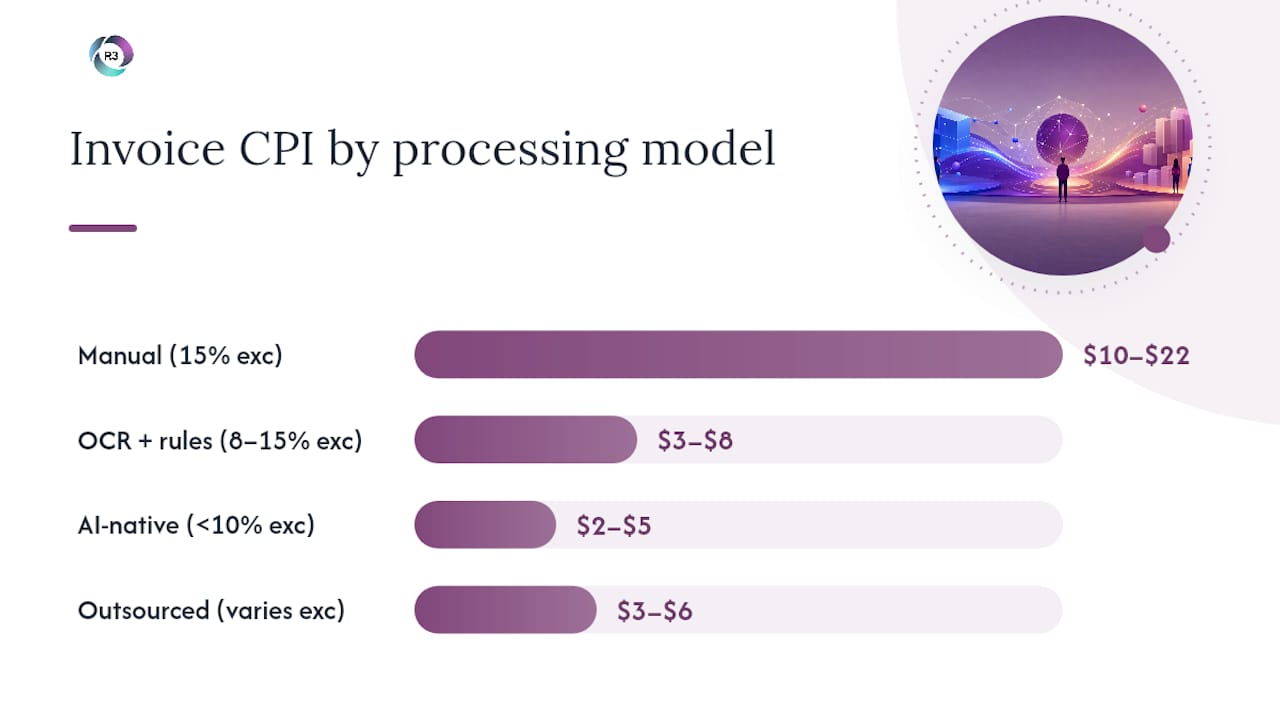
Sources: Lido.app benchmarks; Transformance
Pricing scenarios:
At 1,000 invoices per month, a per-invoice model at $4.50 runs $4,500/month. An FTE-based model with a dedicated remote AP professional from the Philippines might run $1,800–$2,500/month all-in, covering that volume and additional AP tasks. At 5,000 invoices, per-invoice pricing at $4.50 totals $22,500/month, while two dedicated FTEs handling the full workflow could cost $4,000–$5,000/month.
Hidden fees to watch for: Indexing fees charged per page rather than per invoice, overage charges above volume tiers, template setup and maintenance fees for OCR systems, exception-handling surcharges (often $1–$3 per exception), and annual price escalation clauses. Always ask for an all-in sample invoice showing every line item before you sign.
What can go wrong: risks and hidden problems to plan for
Outsourcing AP is not a set-it-and-forget-it decision. The most common failure mode is not a bad provider — it is a poorly structured contract that leaves the client managing problems the provider was supposed to own.
Core risks:
Loss of visibility and control: Without real-time dashboards and shared workflows, your team learns about exceptions and delays after the fact. Finance leaders consistently report that this visibility gap shifts workload back to internal staff, eroding the expected savings.
Indexing errors and mis-coding: Low-cost indexers working at high speed make data-entry mistakes. A 2% error rate on 5,000 invoices per month means 100 invoices per month requiring correction — each one adding internal labor cost back into your CPI.
Hidden and variable fees: Overage charges, exception surcharges, and template maintenance fees can add 20–40% to the quoted per-invoice rate. Always model the all-in cost at your actual exception rate, not the provider’s best-case scenario.
Security and data-residency concerns: Invoice data contains vendor banking details, pricing agreements, and financial forecasts. Confirm where data is stored, who has access, and whether the provider holds SOC 2 Type II or ISO 27001 certification.
Vendor lock-in: Proprietary portals and non-standard data formats make switching providers expensive. Negotiate data portability and export rights before you sign.
Operational problems that recur in practice: exception backlogs that pile up when the provider’s escalation path is unclear, missed early-payment discount windows because approval routing is slower than promised, and supplier onboarding delays that push go-live timelines out by weeks. Each of these has a straightforward mitigation: define it in the SLA before the contract is signed.
Pro Tip: Build a shared exception dashboard into your contract as a non-negotiable. If the provider cannot show you real-time exception status, aging invoices, and match rates in a live view you control, treat that as a red flag — not a feature to negotiate later. Governance without visibility is just hope.
For a broader look at how to outsource without losing control, the principles that apply to AP outsourcing are the same ones that apply to any delegated business function.
Which service model fits your situation?
Three distinct models exist in the market, and they differ in who owns the process, who owns the technology, and how you govern the relationship.
Fully managed BPO
A large business process outsourcing firm takes end-to-end ownership of your AP workflow, including technology, staffing, and SLA delivery. You receive processed invoices and reporting; the provider manages everything in between.
Pros: Single point of accountability, established technology stacks, scalable capacity. Cons: Less flexibility, higher minimum volumes, proprietary platforms that create lock-in, and less day-to-day visibility into how work is done.
Hybrid managed service with automation
A provider combines a technology platform (OCR or AI-native extraction) with a managed-service layer for exceptions and oversight. You may retain some internal AP staff who handle approvals and vendor management.
Pros: Technology-driven CPI reduction with human oversight for complex invoices. Cons: You pay for both the platform and the managed layer; integration complexity is higher.
Dedicated remote staff (staff augmentation)
You hire dedicated remote AP professionals who work exclusively for your business, integrated directly into your ERP and workflows. The staffing partner handles HR, payroll, and compliance; you direct the work. This is the model R3source operates.

Pros: Full visibility and control, predictable monthly cost, staff who know your vendors and processes, and flexibility to assign tasks beyond pure invoice processing. Cons: You retain process ownership, so internal management time is required.
Integration checklist for any model:
Confirm ERP connector availability (SAP, Oracle NetSuite, Microsoft Dynamics, QuickBooks, Sage).
Define the secure file transfer or API protocol for invoice intake and processed-data return.
Establish supplier onboarding steps and a timeline for migrating existing vendors to the new intake channel.
Agree on a shared exception dashboard or reporting cadence before go-live.
Document escalation paths: who contacts whom, at what threshold, and within what response time.
Typical first 60–90 days by model:
Days 1–14: Kick-off, ERP integration setup, intake channel configuration, and staff onboarding or platform provisioning.
Days 15–30: Pilot with a defined invoice subset (typically 10–20% of volume); baseline KPI measurement begins.
Days 31–60: Exception review, rule refinement or staff training adjustments, supplier onboarding for remaining vendors.
Days 61–90: Full volume transition, SLA review meeting, and first formal KPI report against agreed targets.
BPO governance best practices consistently point to the pilot phase as the highest-leverage window for catching integration gaps before they become production problems.
How does technology choice affect your cost and exception rate?
Technology architecture is the single biggest driver of CPI — more than provider geography, company size, or invoice volume. Understanding the three architectures helps you evaluate provider claims and ask the right questions during demos.
Manual data entry
A human operator keys invoice data from a scanned image or PDF into your ERP. Every field is touched by a person. CPI runs $10–$22, exception rates are high, and throughput is limited by headcount.
OCR with rules-based processing
Optical character recognition extracts text from invoice images, and a rules engine maps fields to ERP data based on templates. CPI drops to roughly $3–$8, but template maintenance is ongoing: every new supplier format or layout change requires a template update, and unrecognized formats fall to exception queues.
AI-native document understanding
Machine-learning models trained on large invoice datasets extract fields without fixed templates. Vendor deployment data shows AI-native architectures can target CPI in the $2–$5 range with exception rates under 10%, because the model generalizes across formats rather than failing on unrecognized layouts. The tradeoff is higher upfront implementation cost and a need for sufficient invoice volume to justify the investment.
Technology comparison:
Architecture | CPI range | Typical exception rate | Template maintenance | Onboarding speed |
Manual entry | $10–$22 | 15% | None required | Fast (days) |
OCR + rules-based | $3–$8 | 8–15% | High (ongoing) | Moderate (weeks) |
AI-native | $2–$5 | Under 10% | Low | Moderate to slow |
The gap between OCR and AI-native is structural, not incremental. Technology architecture, not company size, is the primary driver of reaching the $2–$3 CPI tier that legacy OCR approaches cannot reliably achieve.
Pro Tip: AI-native processing earns its investment when you process more than 2,000 invoices per month, have high supplier churn (frequent new vendors), or deal with complex multi-line POs. Below that volume threshold, a well-managed OCR or dedicated remote-staff model often delivers better ROI with less implementation risk.
How do you choose the right outsourcing provider?
Selection criteria should map directly to the dimensions that affect your CPI, cycle time, and risk exposure. Use this checklist during RFPs and vendor demos.
Selection criteria:
Primary benefit delivered (cost reduction, speed, accuracy, or scalability) and whether the provider can demonstrate it with client KPI data.
Pricing model transparency: can they show you an all-in sample invoice with every fee line?
Technology stack: manual, OCR/rules, or AI-native — and who maintains templates or models.
ERP integration: certified connectors for your specific platform, not just “we support it.”
Security certifications: SOC 2 Type II and ISO 27001 are the baseline for handling financial data.
SLA specifics: CPI targets, exception rate floors, match rate minimums, uptime guarantees, and response times for escalations.
Implementation timeline: realistic pilot start date and full-cutover estimate for your volume.
Questions to ask every provider:
What is your current average CPI for a client at my invoice volume, and how is it calculated?
What is your exception rate, and what happens to exceptions — who resolves them and within what SLA?
Which ERP connectors are certified, and what is the integration timeline?
Do you hold SOC 2 Type II certification, and can you share the report?
Where is invoice data stored, and who has access?
What does your pilot look like — volume, duration, and exit criteria?
What service credits apply if you miss SLA targets?
Red flags during sales conversations:
No KPI data from existing clients.
Opaque or bundled pricing with no per-line breakdown.
No audit trail or document repository for processed invoices.
Resistance to a pilot before full commitment.
No enterprise security certifications.
Contract negotiation tips:
Negotiate a 30–60 day pilot with defined exit rights if KPIs are not met.
Include a rollback clause: you retain all data in a portable format if you terminate.
Specify audit rights: you can request a process audit with 5 business days’ notice.
Tie service credits to specific KPI shortfalls (e.g., 10% credit for every month CPI exceeds the contracted ceiling).
Cap annual price escalation at a defined percentage.
For a practical outsourcing readiness checklist that covers vendor selection and internal preparation, that resource walks through the decision framework step by step.
What does the onboarding timeline look like, and which KPIs matter most?
Setting realistic expectations before go-live prevents the most common source of early dissatisfaction: a mismatch between what the client expected in week two and what the provider actually delivers.
Typical implementation timeline:
Phase | Duration | Key activities |
Pilot | 2–6 weeks | Subset of invoices (10–20% of volume), baseline KPI capture, integration testing |
Phased onboarding | 30–60 days | Remaining supplier onboarding, rule or model refinement, staff training |
Full cutover | 60–90 days | Full volume live, SLA enforcement begins, first formal KPI review |
Steady state | 90–180 days | Ongoing KPI monitoring, quarterly SLA reviews, continuous improvement cycles |
Timeline varies by model: dedicated remote staff can reach full cutover in 30–45 days for mid-market volumes; fully managed BPO with complex ERP integrations often takes 60–90 days minimum.
KPI dashboard for the first 90–180 days:
CPI: Track weekly. Target: at or below the contracted ceiling by day 60.
Exception rate: Track weekly. Target: below 10% by end of pilot; below 8% at steady state.
Match rate: Track per invoice batch. Target: above 85% straight-through for PO-backed invoices.
Invoice cycle time: Track from receipt to payment-ready. Target: defined in SLA, typically 24–72 hours for standard invoices.
Straight-through processing rate: The percentage of invoices that complete the full workflow with zero human touches. Higher is better; track trend, not just point-in-time.
DPO/DSO effects: Review monthly. Faster processing should improve early-payment discount capture within 60 days.
Operational handoffs to monitor during the pilot:
Integration issues: file transfer failures, field-mapping errors, or ERP posting rejections should be logged and resolved within 24 hours.
Supplier onboarding speed: slow vendor migration to the new intake channel is the most common cause of pilot delays.
Exception queue aging: any exception older than 48 hours without a resolution update is a governance signal worth escalating.
Virtual assistant integration best practices apply directly here — the same change-management principles that govern remote-staff onboarding apply to any outsourced AP transition.
The honest case for outsourcing AP — and when to keep it in-house
The conventional wisdom says outsourcing AP is a cost-reduction play. That is true, but it is only half the picture. The other half is what you give up — and whether the governance structure you negotiate actually protects you from giving up more than you intended.
The finance leaders who get the most from outsourcing share one trait: they treat the provider relationship as a managed vendor, not a delegated problem. They set KPIs before go-live, review them monthly, and enforce service credits when targets are missed. The ones who struggle treat outsourcing as a handoff and then wonder why their CPI did not move.
There is also a case for keeping AP in-house that rarely gets written about honestly. If your invoice volume is under 300 per month, your supplier base is stable, and your ERP already handles matching and approval routing, the overhead of managing an external provider can exceed the savings. Outsourcing adds management work. For small volumes, that work may not be worth it.
Where outsourcing genuinely wins is in the 500–10,000 invoice-per-month range, especially when supplier count is high, invoice formats vary, or your internal team is stretched across multiple functions. In that range, a dedicated remote AP professional or a managed service with clear SLAs can deliver real CPI reduction without the complexity of an enterprise BPO contract.
R3source’s dedicated remote-staff model is worth considering specifically because it preserves your visibility. Your AP professional works in your ERP, follows your approval workflow, and reports to your team. You get the cost structure of outsourcing with the control of an in-house hire — and that combination is harder to find than most providers will admit.
R3source gives you cost savings and full AP visibility
The managed BPO path and the enterprise automation platform are not the only routes to lower CPI. R3source places dedicated remote AP professionals from the Philippines directly into your workflow — trained on your ERP, your approval process, and your supplier base — at a predictable monthly cost that typically runs well below a U.S.-based hire.
What that means in practice: your AP professional handles invoice receipt, data entry or extraction, PO matching, GL coding, exception flagging, and payment preparation inside your existing systems. You retain full visibility, final approval authority, and the ability to redirect the role as your needs change. There are no per-invoice surcharges, no template maintenance fees, and no proprietary portal creating lock-in.
R3source’s model fits businesses processing 300–10,000 invoices per month that want a long-term, accountable team member rather than a black-box BPO contract. Every placement includes onboarding support, performance monitoring, and the ability to scale your team as volume grows.
The next step is a free introductory consultation to assess your current CPI, identify the highest-leverage tasks to delegate, and size the right engagement for your volume. Book your consultation and get a clear picture of what a dedicated remote AP professional would cost versus what you are paying today.
Sources
The following sources informed the benchmarks, risk analysis, and technology comparisons throughout this article.
This article is general information, not a substitute for advice from a qualified financial advisor. Consult a qualified financial professional about your own circumstances before acting on anything here.
Recommended
Comments