

What Can Virtual Assistants Do for Your Small Business?


A virtual assistant (VA) is a skilled remote professional who handles diverse tasks across administration, customer service, marketing, and operations to help small businesses run efficiently. If you are running a business and carrying more than you ever expected, a VA is one of the most direct ways to reclaim your time and focus on growth. Understanding what can virtual assistants do for your specific business is the first step toward building a support system that actually works.
Virtual assistants now manage over 100 tasks across six or more business departments, enabling end-to-end operational support from a remote location. That breadth means a single VA hire can touch nearly every corner of your daily operations. R3source provides VAs from the Philippines who are trained to integrate directly into your business, handling the backend so you can focus on revenue.
What can virtual assistants do across your business operations?
Virtual assistants cover five core task categories that small business owners delegate most often. Each category represents real, recurring work that pulls your attention away from growth.

Administrative support
VAs perform administrative duties including managing emails, scheduling meetings, arranging travel, and ordering supplies. They function as a remote administrative contractor, handling the daily operational rhythm that keeps a business moving. Strong VA email management alone can recover hours each week for a busy owner.
Customer service
Customer service tasks handled by VAs include responding to inquiries, managing live chat, coordinating refunds, and maintaining FAQ documentation. They handle front-line support and escalate complex issues when needed. This keeps your customers satisfied without requiring your direct involvement in every interaction.
Marketing support
Marketing support from VAs includes creating social media posts, conducting influencer outreach, updating website content, and handling SEO tasks like writing meta descriptions. Consistent marketing output is one of the first things small business owners sacrifice when they get busy. A VA keeps that output steady without adding to your workload.
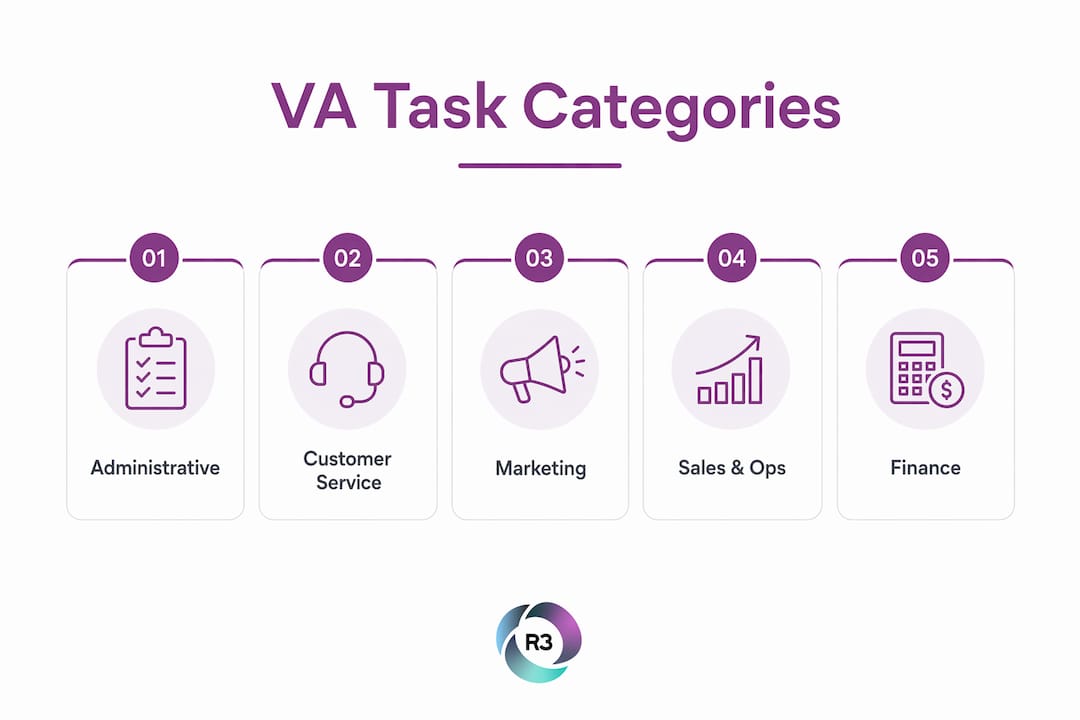
Sales and operations
VAs manage CRM pipelines, process orders, track inventory, and handle appointment setting. These tasks are repetitive but critical. Delegating them frees you to focus on closing deals and building client relationships.
Finance and bookkeeping
Bookkeeping and finance tasks handled by VAs range from expense tracking and pricing updates to invoice processing and vendor coordination. A VA does not replace your accountant, but they handle the daily financial admin that would otherwise pile up on your desk.
Pro Tip: Start by delegating one category at a time. Most business owners see the fastest results when they begin with administrative tasks, then expand into customer service once the VA is fully onboarded.
Task Category | Common VA Responsibilities |
Administrative | Email management, scheduling, data entry, travel booking |
Customer Service | Inquiry responses, live chat, refund coordination, FAQ updates |
Marketing | Social media posts, SEO tasks, content updates, outreach |
Sales and Operations | CRM management, order processing, appointment setting |
Finance | Expense tracking, invoice processing, vendor coordination |
How have virtual assistant roles evolved with specialization?
The VA role has shifted significantly from basic data entry and scheduling into complex, specialized functions that require real expertise. Roles have expanded from simple administrative work to include CRM pipeline management, live chat support, and complex bookkeeping. That shift means you can now hire a VA with a specific skill set matched to your business type, not just a generalist who handles whatever comes up.
Specialization benefits different business models in distinct ways. A real estate business needs a VA who understands CRM workflows and lead follow-up sequences. An e-commerce store needs someone who can manage product listings, process returns, and handle customer inquiries at volume. A service-based company often needs a VA focused on appointment setting and client communication.
“The most effective VAs are not generalists filling gaps. They are specialists who own a defined part of your operation and improve it over time.”
Technology empowers VAs to expand their effectiveness well beyond traditional tasks. A VA trained in tools like HubSpot, Zendesk, or Asana can manage workflows that previously required an in-house team member. The combination of specialization and software proficiency is what makes modern VAs genuinely valuable to growing businesses.
The virtual assistant skills that drive the most business growth are not soft skills alone. They include technical proficiency in the platforms your business already uses, which means onboarding a well-matched VA is faster and more productive than hiring a generalist.
How to delegate tasks effectively to a virtual assistant
Effective delegation is the difference between a VA who transforms your business and one who creates more work for you. Effective delegation starts with simple, well-defined tasks, then expands as the VA demonstrates competence and builds familiarity with your processes.
Follow this sequence when bringing a VA into your operations:
List every recurring task you do in a week. Write down everything, including tasks that take less than 10 minutes. Small tasks add up to hours of lost time.
Identify tasks that do not require your direct judgment. Email sorting, appointment scheduling, and data entry are strong starting points. These are low-risk and easy to document.
Create a simple process document for each task. A one-page checklist or short video walkthrough is enough. Clarity at the start prevents errors later.
Assign tasks in batches, not all at once. Give your VA two or three tasks to own fully before adding more. This builds confidence on both sides.
Set a weekly check-in. A 15-minute call each week keeps communication clear and surfaces any issues before they become problems.
Pro Tip: The biggest mistake business owners make is delegating tasks without documenting the process first. Spend 20 minutes recording a screen walkthrough before handing off any new task. Your VA will follow it accurately, and you will not need to repeat yourself.
Avoid the common pitfall of micromanaging after delegation. Once you have assigned a task with clear instructions, let your VA own it. Check results, not methods. The best practices for VA integration consistently point to trust and clear communication as the two factors that determine whether a VA relationship succeeds or stalls.
What tools do virtual assistants use to get more done?
Automation and collaboration tools widely used by VAs include email management platforms, social media schedulers, CRM systems, and project management apps. These tools are what allow a single VA to handle work that might otherwise require two or three part-time employees.
Here are the main tool categories VAs rely on:
Email and calendar management: Gmail, Outlook, and Google Calendar for scheduling and inbox organization
CRM and sales support: HubSpot, Zoho CRM, and Salesforce for pipeline tracking and lead management
Customer service: Zendesk, Freshdesk, and Intercom for live chat and ticket management
Social media scheduling: Buffer, Hootsuite, and Later for consistent content publishing
Project management: Asana, Trello, and ClickUp for task tracking and team collaboration
Bookkeeping support: QuickBooks and Xero for expense tracking and invoice processing
Proficiency in these platforms is a core part of what makes a VA effective. A VA who already knows your CRM does not need weeks of training before contributing. That speed matters when you are trying to grow.
Tool Category | Purpose | Common Platforms |
Email and Calendar | Inbox management, scheduling | Gmail, Outlook, Google Calendar |
CRM | Lead tracking, pipeline management | HubSpot, Zoho CRM, Salesforce |
Customer Support | Live chat, ticket handling | Zendesk, Freshdesk, Intercom |
Social Media | Content scheduling, publishing | Buffer, Hootsuite, Later |
Project Management | Task tracking, collaboration | Asana, Trello, ClickUp |
Key Takeaways
Virtual assistants deliver the most value when they are matched to specific task categories, equipped with the right tools, and given clear processes from the start.
Point | Details |
Broad task coverage | VAs handle over 100 tasks across administration, customer service, marketing, and finance. |
Specialization matters | Matching a VA’s skills to your business type produces faster results than hiring a generalist. |
Delegation requires clarity | Document each task before handing it off to reduce errors and speed up onboarding. |
Tools amplify output | VAs trained in CRM, scheduling, and project management tools contribute from day one. |
Start small, then expand | Begin with one task category and add responsibilities as the VA builds familiarity with your business. |
What working with VAs taught me about building a real support system
Most business owners I have spoken with underestimate the VA relationship at first. They treat it like hiring a temp for a single project. That mindset limits the results they get.
The owners who see the biggest gains treat their VA like a long-term team member from the start. They invest time in onboarding, communicate expectations clearly, and give the VA room to grow into the role. That investment pays off quickly. Within a few weeks, a well-matched VA stops being someone you manage and starts being someone you rely on.
The other thing I have noticed is that the task list matters less than the fit. A VA who understands your industry and your communication style will outperform a more technically skilled VA who is a poor match for your working style. When you are evaluating VA staffing options, prioritize fit alongside skill.
My honest advice: do not wait until you are at capacity to hire a VA. Hire before you hit the wall. The time you spend onboarding a VA while you still have bandwidth is an investment that protects your future capacity for growth.
— Ellis
R3source: offshore virtual assistant services built for small businesses
Small business owners who are ready to build their team have a clear path forward with R3source. R3source provides offshore virtual assistant services staffed by trained professionals from the Philippines who integrate directly into your daily operations. Every VA is matched to your business type, your tools, and your specific task needs.
R3source is not a freelance marketplace. It is a dedicated staffing partner that provides consistent, accountable remote professionals for the long term. Whether you need administrative support, customer service coverage, CRM management, or marketing help, R3source builds the right support around your business. If you are ready to outsource your virtual assistant role to a reliable partner, R3source is the place to start.
FAQ
What tasks can a virtual assistant handle for a small business?
Virtual assistants handle tasks across administration, customer service, marketing, sales operations, and bookkeeping. They manage over 100 distinct tasks spanning six or more business departments.
How do virtual assistants help with customer service?
VAs respond to customer inquiries, manage live chat, coordinate refunds, and maintain FAQ documentation. They handle front-line support and escalate complex issues to the appropriate team member.
What tools do virtual assistants typically use?
VAs commonly use platforms like HubSpot, Zendesk, Asana, Buffer, and QuickBooks to manage CRM, customer support, project tracking, social media, and bookkeeping tasks.
How do I know which tasks to delegate to a virtual assistant first?
Start with recurring tasks that do not require your direct judgment, such as email management, scheduling, and data entry. Document each process before handing it off to reduce errors during onboarding.
What is the difference between a general VA and a specialized VA?
A general VA handles a broad range of administrative tasks, while a specialized VA focuses on a defined function such as CRM management, bookkeeping, or social media. Specialized VAs typically deliver faster results in their area of expertise.
Recommended
Comments