

Lead Generation Virtual Assistant Tasks: Your 2026 Playbook


A virtual assistant can own seven core lead generation virtual assistant tasks right now: prospect research and list building, outreach and prospecting, lead qualifying and nurturing, CRM and database management, appointment setting, analytics and reporting, and tools and template management. Hand these off correctly and you get a steady pipeline, cleaner data, and more time to close.
Here is what to expect across your first 90 days:
Days 1–30: VA completes a test batch of verified contacts, logs them in your CRM, and sends first-touch drafts for your review. You confirm quality before volume increases.
Days 31–60: Outreach cadences go live. The VA runs daily list building, logs replies, and produces a weekly snapshot report. You review metrics and approve messaging tweaks.
Days 61–90: Volume ramps. Appointment setting begins. You review KPIs weekly and adjust targeting based on reply and booking rates.
The principle behind all of it: delegate repeatable, rules-based tasks and keep strategy, final qualification, and pricing decisions with your team.
Key Takeaways
Delegating lead generation virtual assistant tasks works when you start with rules-based work, measure accuracy before scaling volume, and keep strategy and final qualification with your team.
Point | Details |
Start with list building | Assign a sample test batch first; require mostly usable data before expanding scope. |
Protect deliverability early | Warm your sending domain, set SPF/DKIM/DMARC, and pause outreach if bounce rate exceeds 3%. |
Track the six core KPIs | Monitor contacts researched, outreach sent, positive reply rate, meetings booked, bounce rate, and pipeline contribution every week. |
Use the handoff template | Every qualified reply needs a 100-word handoff note with context, key quote, and urgency signal. |
R3source manages execution | R3source provides trained, supervised VAs for lead generation, CRM, and appointment setting with ongoing QA. |
Table of Contents
What lead generation virtual assistant tasks cover for research and list building
Appointment setting: how a VA books calls without creating chaos
Analytics and reporting: the KPIs your VA should track weekly
What actually separates successful VA programs from struggling ones
R3source gives you a managed lead-generation VA, not just a placement
What lead generation virtual assistant tasks cover for research and list building
Your VA’s first job is turning your ideal customer profile (ICP) into a clean, verified contact list. That means translating your ICP criteria into search filters, mapping target accounts, discovering decision-maker contacts, and enriching each record before it enters your CRM.
Every contact record should capture these fields: company name, job title, verified business email, LinkedIn profile URL, company size, industry, location, and verification status with source noted. Skipping any of these creates gaps that slow down outreach later.
Acceptable sources include LinkedIn Sales Navigator, industry-specific directories, existing CRM exports, and company websites. Instruct your VA to follow platform privacy and data-handling rules when collecting and storing personal data, and document those compliant sources in your SOP from day one.
Accuracy checklist for every list:
Email verified with a tool such as NeverBounce or ZeroBounce
LinkedIn URL confirmed active
Job title current (check for recent role changes)
No duplicate entries against existing CRM records
Source column completed for every row
Pro Tip: Before you hand over full list-building duties, assign a sample task and require a high percentage of usable data (verified email, correct title, no duplicates). A short test like this is more predictive of quality than any interview, as noted in DigitalTreed’s hiring guidance.
How a VA runs outreach and prospecting end-to-end
A VA can own the execution of outreach across email and LinkedIn while you retain control of messaging strategy and value propositions. The key is giving them approved templates and clear guardrails before a single message goes out.
Channels a VA can run:
Email outreach via a shared inbox or dedicated sending domain (never your primary domain)
LinkedIn manual outreach using connection requests and direct messages within daily platform limits
Cold call preparation including script drafts, call lists, and note logging after calls your reps make
Multi-touch follow-up sequences using approved templates and scheduled timing
Sample 6-touch email + LinkedIn cadence:
Day 1 — Email: short, personalized first touch referencing a specific company detail
Day 3 — LinkedIn: connection request with a one-line note
Day 5 — Email: follow-up adding one relevant insight or resource
Day 8 — LinkedIn: brief message if connected
Day 12 — Email: final value-add touch with a soft call to action
Day 16 — Email: polite breakup message leaving the door open
Do/don’t rules for outreach:
Do use approved opening lines only; no improvised value propositions
Do throttle sends to a moderate number of emails per day per domain during warmup
Do set SPF, DKIM, and DMARC on any sending domain before launching sequences
Don’t send from your primary business domain
Don’t exceed LinkedIn’s daily connection limits (typically 20–25 per day)
Don’t skip logging every touch in the CRM, even unanswered ones
Pro Tip: Warm your sending domain for at least two weeks before scaling volume. Monitor bounce rates daily in the first month. A bounce rate above 3% is a signal to pause and clean the list before continuing.
Job listings on Indeed confirm that outreach, prospecting, and appointment setting are among the most commonly assigned VA tasks, which means the market has already validated this delegation model.
How a VA qualifies leads and keeps long-term prospects warm
Light qualification is well within a VA’s scope. What they should not do is make final go/no-go decisions or discuss pricing. Their job is to surface fit signals, capture expressed interest, and hand off the right context to your sales team.
What a VA can qualify on:
Does the prospect match your ICP (size, industry, role)?
Did they respond positively or ask a clarifying question?
Are they ready to schedule a call, or are they in a “not right now” category?
Compact qualification capture template (on every reply):
Prospect name and company
Response type (positive, neutral, objection, unsubscribe)
Key quote from their reply (verbatim, one sentence)
Urgency signal (immediate interest / future interest / no interest)
Recommended next step (book call / move to nurture / remove)
Handoff note format to your sales rep: Include the prospect’s name and company, the last touch date and channel, the key quote from their reply, the urgency signal, and one sentence of context the rep needs before the call. Keep it under 100 words. Reps who receive a clean handoff note convert at a higher rate than those who have to dig through a CRM to reconstruct context.
Pro Tip: Set a nurture cadence for “future interest” replies: one touch every 30 days with a relevant piece of content or a brief check-in. After 90 days with no engagement, the VA flags the contact for your review before any further outreach.
CRM and database management: keeping your pipeline accurate
A messy CRM costs you deals. Your VA should run daily and weekly hygiene tasks that keep every record current, every stage accurate, and every interaction logged. This is where a prospecting assistant’s value compounds over time — clean data makes every other sales activity faster.
CRM maintenance frequency table:
Task | Frequency | Quality KPI |
Log all outreach and replies | Daily | 100% of touches logged same day |
Deduplicate new records | Daily | Zero duplicate records in active pipeline |
Update lead stage after each touch | Daily | Stage accuracy rate |
Enrich incomplete records | Weekly | Less than 5% of active records missing required fields |
Archive or remove cold/dead leads | Monthly | Active pipeline contains only engaged contacts |
Full data audit against ICP criteria | Monthly | ICP match rate |
Minimum required fields before a lead advances to the next stage: verified email, confirmed job title, company name, last touch date, response type, and assigned owner. If any of these are missing, the lead stays in its current stage until the VA completes the record.
Access guidance: Give your VA the minimum CRM permissions needed to complete their tasks. A shared inbox for outreach, read/write access to lead and contact records, and view-only access to deal values is a reasonable starting point. Enable audit logging so you can review changes if data quality issues arise.
Appointment setting: how a VA books calls without creating chaos
Appointment setting is one of the highest-leverage tasks you can delegate because it removes back-and-forth from your reps’ day entirely. Done well, it also protects your calendar from overbooking and no-shows.
What your VA owns in this process:
Send the initial booking invitation with a scheduling link
Confirm the prospect’s time zone and convert to the rep’s local time
Send a calendar invite with the agenda, duration, and meeting link included
Send a reminder 24 hours before the call
Prepare and send a one-sentence pre-call brief to the rep
Appointment setting checklist for every booking:
Agenda confirmed with the prospect (even a one-line description)
Call duration stated clearly (typically 20 or 30 minutes)
Attendee list confirmed on both sides
Video or dial-in link included in the invite
Time zone explicitly stated in the invite body
Using a shared scheduling tool like Calendly with a delegated booking link removes the back-and-forth entirely and prevents double-booking. Set the VA’s access to a specific calendar slot or a dedicated booking page, not your full calendar.
Pre-call brief format: “Prospect Name at Company Name replied on [date] expressing interest in [topic]. Key quote: ‘[their words].’ Suggested talking point: [one sentence].” That is all a rep needs to walk into a call prepared.
Pro Tip: Require the VA to send a reschedule message promptly after a cancellation. A prompt reschedule attempt recovers a meaningful share of cancelled calls that would otherwise fall out of the pipeline entirely.
Analytics and reporting: the KPIs your VA should track weekly
You should never have to dig for performance data. Your VA produces a weekly snapshot report so you can make decisions in under 10 minutes.
Core KPIs for a VA-run lead program:
KPI | Definition | Healthy threshold |
Contacts researched | New verified records added to CRM | Consistent with agreed weekly target |
Outreach sent | Total first-touch and follow-up messages sent | Per agreed daily/weekly volume |
Positive reply rate | Replies showing interest or asking a question ÷ total outreach sent | 3–8% depending on channel and list quality |
Meetings booked | Confirmed calls scheduled per week | Track trend; flag if declining two weeks in a row |
Bounce rate | Hard bounces ÷ total emails sent | Below 2%; pause outreach above 3% |
Pipeline contribution | Leads that advanced to a sales stage from VA-sourced contacts | Track monthly; compare to total pipeline |
A “positive reply” is any response that is not an unsubscribe or a hard no. This includes questions, requests for more information, and “not right now but follow up in X months.” Counting these consistently is what makes your reply rate a meaningful metric rather than a vanity number.
Report cadence: Weekly snapshot covering the six KPIs above, plus a 30/60/90-day trend line updated monthly. When bounce rates climb above 2% or positive reply rates drop two weeks in a row, pause outreach and audit the list before resuming.
Tools and templates your VA needs to execute well
The right tools reduce ramp time and keep your VA working within guardrails. Tool fit directly affects how quickly a VA can execute outreach and tracking reliably, so match the tool to the workflow rather than defaulting to the most feature-rich option.
Essential tools and access levels:
CRM (HubSpot, Salesforce, Zoho, or Pipedrive): read/write on contacts and leads; view-only on deals
Shared inbox or dedicated sending domain: full access; never your primary domain
Email verification tool (NeverBounce or ZeroBounce): full access
LinkedIn: your VA’s own account or a company-provided seat; never your personal login
Calendar/scheduling tool (Calendly or Google Calendar with delegated access): booking page only
Spreadsheet or lightweight sequencer: for list management and cadence tracking
Templates to give your VA on day one:
Approved opening lines for each ICP segment (2–3 variations)
Follow-up sequence templates for each touch in the cadence
Qualification capture form (the 5-field template from Section 4)
Handoff brief template for sales reps
Data enrichment checklist (the accuracy checklist from Section 2)
On AI assistance: Your VA can use AI tools to draft outreach variations or summarize research. Every AI-drafted message needs human review before it sends. AI drafts save time; unreviewed AI drafts create off-brand or inaccurate messages that damage deliverability and trust.
Pro Tip: Review platform terms of service before delegating tasks that involve accessing platform accounts or performing outreach on your behalf. Google’s terms and LinkedIn’s user agreement both contain rules about automated or delegated account use that belong in your SOP.
How to delegate to a lead-generation VA: step-by-step
The most common mistake is handing over too much too fast. Start with the tasks that have the clearest rules and the easiest quality checks, then expand scope as the VA proves accuracy.
Prioritization order for week 1:
Start with list building and data enrichment. These are rules-based, measurable, and low-risk. Once the VA delivers a clean 50-contact sample with 90%+ usable data, move to CRM logging and outreach drafting. Outbound sequences come last, after you have reviewed at least one full week of draft messages.
30/60/90 onboarding checklist:
Week 1–2: Tool access granted, ICP brief shared, 50-contact test batch assigned, messaging templates handed over
Week 3–4: Review test batch quality, approve first outreach drafts, set daily volume targets
Days 31–60: Outreach goes live, VA sends weekly KPI snapshot, you review and give feedback weekly
Days 61–90: Volume ramp, appointment setting added, monthly data audit completed
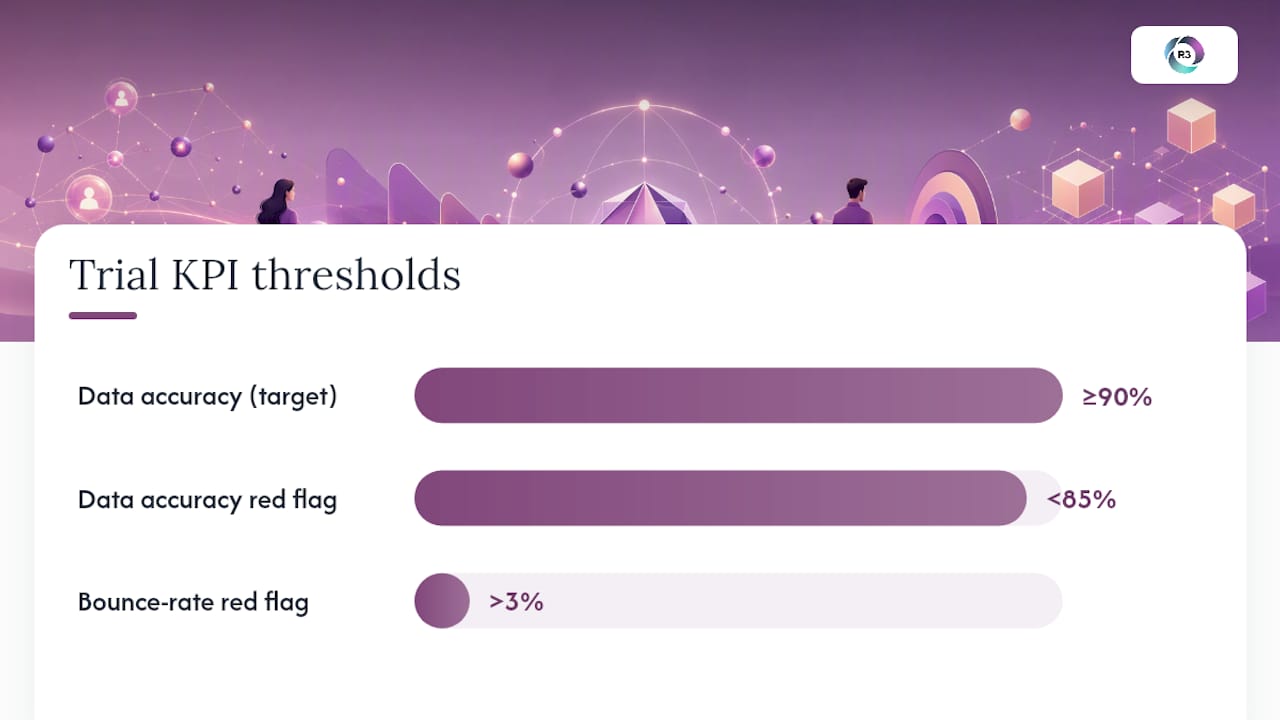
Trial KPIs for the first 30 days: data accuracy rate (target ≥ 90%), reply quality score (are handoff notes complete?), and meetings booked per week once outreach is live.
Red flags that need immediate attention:
Bounce rate above 3% on any sending domain
Data accuracy dropping below 85% on a weekly sample check
Outreach messages that deviate from approved templates
Qualified replies not escalated to the sales team within 24 hours
Starting with repeatable, rules-based tasks and adding complexity only after quality holds steady is the approach that produces reliable results without requiring constant oversight. You can also explore what to outsource to a VA across other business functions once your lead-generation workflow is stable.
Pro Tip: Treat this hire as a process hire. The value comes from defining repeatable steps and measuring outcomes, not from offloading decisions. A VA who follows a clear SOP consistently outperforms one given broad discretion with no structure.
How R3source prepares and manages lead-generation VAs
Hiring a VA directly means you own recruitment, training, supervision, and quality control. A managed provider like R3source handles all of that so you spend your time reviewing results, not managing execution.
What R3source adds to the standard VA hire:
Recruitment and vetting of candidates matched to your ICP and outreach requirements
Training to your specific SOPs before the VA starts client-facing work
Ongoing supervision and daily QA so quality does not drift after the first month
Replacement coverage if a VA is unavailable, with no gap in your pipeline activity
Onboarding template outline R3source uses:
Access checklist (CRM, inbox, LinkedIn, calendar, verification tool)
ICP brief (target industries, titles, company sizes, geographic focus)
Messaging guardrails (approved templates, tone rules, topics to avoid)
Test batch plan (50 contacts, accuracy review before volume increases)
Reporting cadence (weekly KPI snapshot, monthly trend review)
SOP structure for ongoing QA:
Daily: outreach logged, replies escalated, list building targets met
Weekly: KPI snapshot delivered, sample of 10 outreach messages reviewed for brand alignment
Monthly: full data audit, ICP match rate reviewed, process improvements documented
Pro Tip: Before signing with any managed provider, ask three questions: Who supervises the VA daily? What is the correction process when quality drops? What tool access does the VA receive and who controls it? Clear answers to these three questions separate a genuine managed model from a staffing agency that simply places and walks away.
What actually separates successful VA programs from struggling ones
The businesses that get the most from their lead-generation VA programs share one habit: they treat the VA as a process asset, not a person to offload problems to.
The most common beginner mistakes are predictable. Founders hand over strategy before the VA has proven accuracy on basic tasks. They let LinkedIn outreach run on autopilot without checking daily limits, which triggers account restrictions. They ignore rising bounce rates until deliverability is damaged. And they skip weekly message sampling, so off-brand language drifts into sequences for weeks before anyone notices.
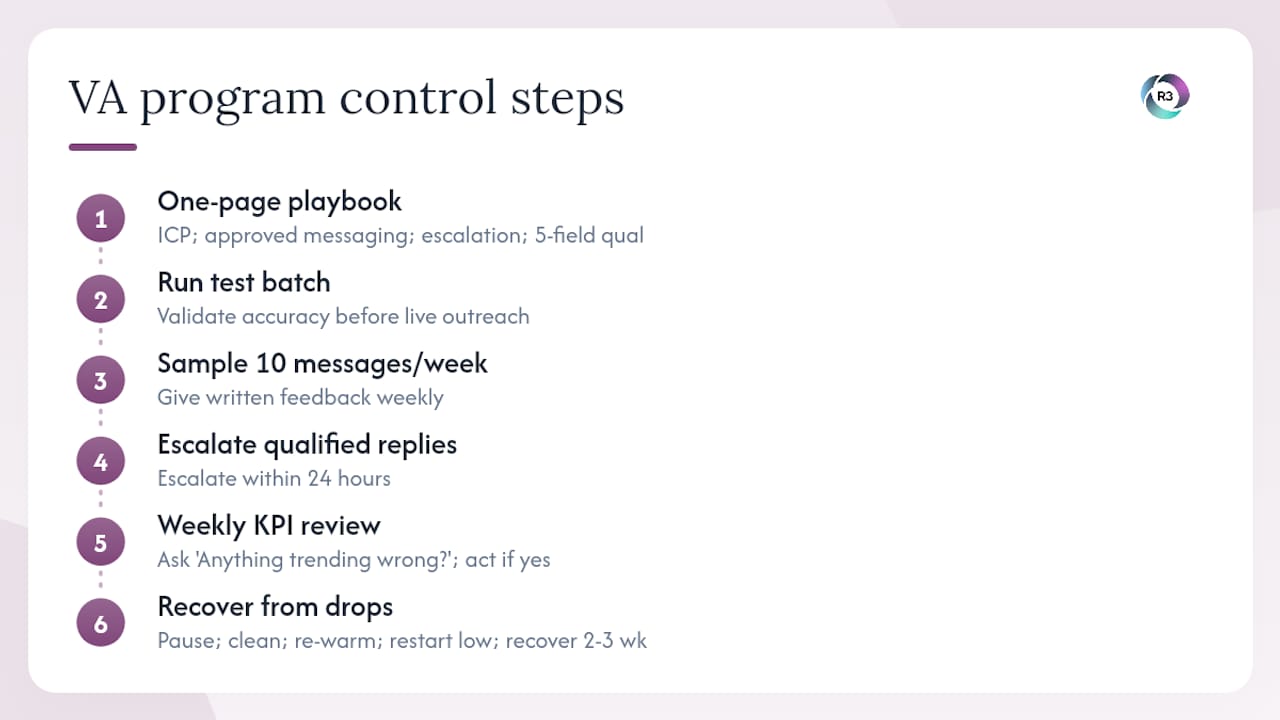
The fixes are straightforward. Write a one-page playbook before the VA starts: ICP criteria, approved messaging, escalation rules, and the five-field qualification template. Run a test batch before any live outreach. Sample 10 messages per week and give written feedback. Set a hard rule that any qualified reply gets escalated within 24 hours, no exceptions.
One pattern that shows up repeatedly: a business hands over outreach too early, sees reply rates drop, and assumes the VA is the problem. Usually the issue is a list that was never properly verified or a sending domain that was never warmed. The corrective step is almost always the same: pause, clean the list, re-warm the domain, and restart at lower volume. Reply rates recover within two to three weeks.
The founders who keep quality without micromanaging do one thing consistently: they review the weekly KPI snapshot every Monday morning and ask one question. “Is anything trending in the wrong direction?” If the answer is no, they leave the VA to execute. If the answer is yes, they address it before it compounds.
R3source gives you a managed lead-generation VA, not just a placement
You now have the full framework: the task buckets, the templates, the KPIs, and the onboarding checklist. The question is whether you want to build and manage that system yourself or have it handed to you ready to run.
R3source provides dedicated, long-term remote professionals from the Philippines who are trained to your SOPs before they start. That means list building, CRM hygiene, outreach execution, appointment setting, and weekly reporting are handled by someone who already knows your process, not someone you are still training in month two.
The difference between a managed VA and a freelance placement is accountability. R3source supervises daily execution, reviews quality weekly, and handles replacement coverage so your pipeline activity never stops. Lower overhead than a full-time hire, no recruiting time, and a team that stays integrated with your operations long-term.
Book an introductory consultation to talk through your lead-generation needs, or explore offshore virtual assistant options to see how R3source structures managed staffing for U.S. businesses.
Sources
Recommended
Comments